As an Amazon Associate, we earn from qualifying purchases. Some links on this site are affiliate links at no extra cost to you. Our recommendations are based on thorough research and editorial judgment.


The 3 Best Home Launch Monitors for Perfecting Your Golf Game

To perfect your golf game, consider the top three home launch monitors:
- Full Swing Kit: Offers 16 data points and a 4K camera for swing analysis.
- SkyTrak+: Features dual Doppler radar for precision, plus access to virtual courses.
- Garmin Approach R10: Lasts up to 10 hours and tracks crucial stats like club speed.
You may be interested


Choose wisely based on accuracy, environmental influence, and budget. There’s more to explore about enhancing your practice sessions effectively.
Key Takeaways
- The Full Swing Kit Golf Portable Launch Monitor offers precise data with 16 key metrics and advanced video analysis features for effective swing review.
- SkyTrak+ is known for its dual Doppler radar technology, portability, and subscription access to world-class golf courses, making it ideal for avid golfers.
- Garmin Approach R10 provides excellent battery life, durability, and training mode features, suitable for golfers of all skill levels looking to improve.
- Key factors to consider include accuracy, portability, user reviews, and integration with existing training setups for maximum practice efficiency.
- Evaluate subscription and maintenance costs to ensure the chosen monitor aligns with your budget and long-term golf practice goals.
Full Swing Kit Golf Portable Launch Monitor
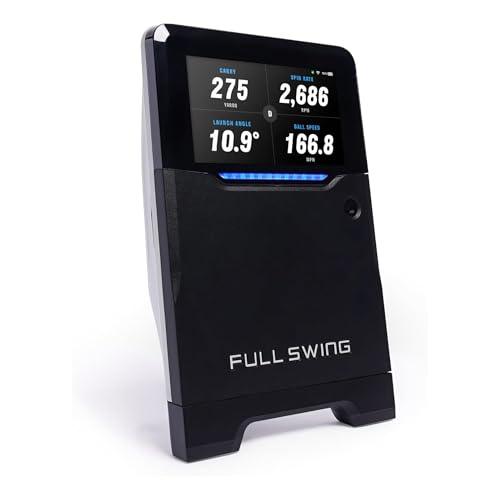
Full Swing Kit Golf Launch Monitor & Simulator Trusted by Tiger Woods | Portable Indoor/Outdoor...
- ADVANCED MACHINE LEARNING 5D RADAR TECHNOLOGY: The most innovative Radar Technology, patented to get the most accurate readings in a more compact design at a lower cost...
- 16 KEY DATA METRICS: Measures carry distance, total distance, spin rate, spin axis, face angle, face-to-path, attack angle, launch angle, ball speed, club speed, smash...
- 4K CAMERA WITH 1080P OUTPUT: Integrated high-resolution camera provides crisp video for swing review and analysis. Enables clear playback through connected devices to...
The Full Swing Kit Golf Portable Launch Monitor is an ideal choice for both amateur and professional golfers looking to enhance their game. Its compact design means you can use it anywhere—indoors or outdoors. Here are some key features:
- Advanced Technology: It uses machine learning radar for precise data.
- Comprehensive Metrics: Get 16 data points, including carry distance and spin rate.
- Video Analysis: Equipped with a 4K camera for swing review.
- User-Friendly: Quick setup with no complex calibrations needed.
Instant feedback is available via OLED display or your iOS device. Elevate your golf performance today!
Best For: The Full Swing Kit Golf Portable Launch Monitor is best for amateur and professional golfers seeking to improve their performance with advanced technology and instant feedback.
Pros:
- Provides 16 comprehensive data points for in-depth analysis of golf swings.
- Compact and portable design allows for outdoor and indoor use.
- Quick and straightforward setup with no need for complex calibrations.
Cons:
- Compatibility is limited to iOS devices, excluding Android users.
- The price point may be high for casual golfers.
- Requires a stable Wi-Fi connection for optimal performance feedback.
SkyTrak+ Launch Monitor and Golf Simulator
Sale


SkyTrak+ Launch Monitor & Golf Simulator (Previous Generation) — Dual Doppler Radar, Enhanced...
- Ultimate Golf Simulation Experience: SkyTrak+ delivers advanced club data—Club Head Speed, Smash Factor, Club Path, and Face Angle. New Doppler Radar and improved...
- Play & Improve: Optimize practice with the Play & Improve plan featuring WGT by TopGolf and TruGolf E6 Connect. Play 100,000+ global courses from home. Personalize your...
- Award-Winning Launch Monitor: Recognized by Golf Digest, Golf Monthly, and Today’s Golfer, SkyTrak+ is the editor’s choice for the best golf launch monitor. Improve...
For serious golfers aiming to elevate their game, the SkyTrak+ Launch Monitor and Golf Simulator stands out due to its accurate data analysis and tournament-style practice settings. Here’s what you need to know:
- Precision: Utilizes dual Doppler radar and enhanced camera technology.
- Design: Lightweight at 2.06 kg; compact dimensions (12.17 x 10.16 x 4.25 inches).
- Functionality: Offers Wi-Fi connectivity, USB-C charging, and access to world-class courses.
- Performance: Best in well-lit setups; misreads occur 2-3 times per 100 balls in poor lighting.
- Subscriptions: Basic features for $130; $250 for full course access.
For a reliable experience, consider purchasing new models to avoid potential issues.
Best For: Serious golfers looking to improve their game with precise data analysis and tournament-style practice settings.
Pros:
- Accurate performance analysis through dual Doppler radar and enhanced camera technology.
- Compact and lightweight design allows for easy setup and portability.
- Access to world-class golf courses and tutorial content enhances practice sessions.
Cons:
- Misreads can occur in poorly lit environments, affecting data accuracy.
- Ongoing subscription costs for enhanced features may add additional expenses.
- Potential issues with refurbished units suggest a preference for purchasing new models.
Garmin Approach R10 Portable Golf Launch Monitor
Sale

Garmin Approach R10, Portable Golf Launch Monitor, Take Your Game Home, Indoors or to The Driving...
- Work to improve your game at home, indoors or on the driving range with a portable launch monitor .Waterproof : IPX7.Control Method:Application,VoiceWater Resistant...
- Track key metrics when paired with a compatible smartphone with the Garmin Golf app to help better your shot consistency, including club head speed, ball speed, swing...
- Understand your golf strengths and areas for improvement by using training mode, which tracks stats for each club and shows a shot dispersion chart based on estimated...

Looking for a reliable and portable golf launch monitor? The Garmin Approach R10 is an excellent choice for golfers at any level. It offers outstanding features in a compact design:
- Battery Life: Enjoy up to 10 hours of use.
- Durability: Waterproof with an IPX7 rating.
- Performance Tracking: Measure club head speed, ball speed, launch angle, and launch direction with impressive accuracy.
- Training Mode: Analyze your performance by tracking stats for each club and viewing a shot dispersion chart.
When paired with the Garmin Golf app, you can record swings and play virtual rounds on over 42,000 courses worldwide.
Best For: The Garmin Approach R10 is best for golfers of all levels looking for a portable and precise launch monitor to enhance their game.
Pros:
- Compact and Portable: Easy to use at home, indoors, or on the driving range.
- Long Battery Life: Provides up to 10 hours of continuous usage.
- Comprehensive Metrics: Accurately tracks key performance metrics for better analysis and improvement.
Cons:
- Requires Subscription: Access to virtual play and additional features requires an active subscription to the Garmin Golf app.
- Potential Compatibility Issues: Video swing analysis requires pairing with a compatible smartphone.
- Price Point: May be considered expensive for beginner golfers who may not use all features.
Factors to Consider When Choosing a Home Launch Monitor

When choosing a home launch monitor, you’ll want to contemplate several key factors. Accuracy and precision are essential; after all, a 5% variance can affect your swing’s analysis markedly. Also, think about how well it connects with your devices and the potential subscription costs for ongoing data analysis features.
Accuracy and Precision Metrics
Choosing a home launch monitor that offers accurate and precise metrics is essential for improving your golf game. When evaluating accuracy, consider these key factors:
- Ball Speed & Launch Angle: Discrepancies as low as +/- 1 mph and +/- 1 degree can affect analysis.
- Advanced Technology: Look for radar or camera systems that provide details like spin rate and club path.
- Environmental Influence: Be aware that lighting and surface type can impact readings; some monitors excel in specific setups.
- Misread Frequency: High-quality monitors should show fewer than 2-3 misreads per 50-100 shots.
- User Reviews: Assess consistency and reliability based on expert ratings and feedback for different devices.
These factors guarantee you get the most from your practice sessions.
Data Analysis Capabilities
To fully understand how your golf game can improve, the data analysis capabilities of a home launch monitor play an essential role. Here are key factors to evaluate:
- Comprehensive Metrics: Look for data points like Carry Distance, Spin Rate, Ball Speed, Club Speed, and Launch Angle to gain insights.
- Advanced Technology: Devices with machine learning or dual Doppler radar enhance the accuracy and reliability of captured data.
- Video Features: Models that offer swing videos alongside metrics support visual analysis for better adjustments.
- Mobile Compatibility: Monitors that sync with apps allow for deeper analysis and advanced metrics.
- Real-Time Data: Choose devices with easily readable screens to provide immediate feedback during practice sessions.
These characteristics will help elevate your performance.
Design and Portability
A well-designed and portable home launch monitor can greatly enhance your practice experience. When choosing one, consider these factors:
- Compact Design: Look for a model that fits easily into your golf bag. This way, you can transport it conveniently to different practice locations.
- Weight: Lighter models are easier to carry, making them ideal for trips to the driving range.
- Setup Process: Verify the installation is quick and straightforward. You shouldn’t need complex alignment sticks or calibration.
- Carrying Case: A protective case can help safeguard your device during travel.
- Battery Life: Opt for a monitor with long battery duration for uninterrupted sessions.
Prioritize these features to maximize your home launch monitor experience.
Connectivity and Compatibility
When it comes to maximizing your practice sessions, connectivity and compatibility play an essential role in choosing a home launch monitor. Here are the key factors to evaluate:
- Device Connectivity: Confirm it connects seamlessly with smartphones, tablets, and smartwatches for real-time feedback.
- App Compatibility: Check if it works with popular golf apps. Many offer advanced analytics to boost your game but may come with subscription fees.
- Wi-Fi or Bluetooth Support: Look for monitors that allow easy data transfer and syncing, enhancing user experience.
- Virtual Golf: Systems that let you play virtual courses can add interactivity to practice.
- Integration: Verify compatibility with existing setups, like simulators, to maximize your practice sessions.
Subscription and Maintenance Costs
Understanding subscription and maintenance costs is essential for anyone considering a home launch monitor. Here’s what you need to know:
- Subscription Fees:
- Basic plans might be around $130 per year.
- Extensive course access can push costs up to $250 annually.
- Assess if premium features are truly necessary for your goals.
- Factor in costs for chargers and compatibility accessories, which can add to your investment.
- Consider protective cases or upgrades; these facilitate longevity and peak performance.
- Full Swings: Most monitors provide reliable data for drives and iron shots, often within 2% accuracy.
- Short Game: Accuracy drops slightly, typically around 5-10% for chips and pitches.
- Putting: Data can be inconsistent, as not all monitors track putts effectively.
Evaluate these costs against your usage needs. By understanding these financial factors, you can make a more informed choice that fits your budget and enhances your golf practice effectively.
Frequently Asked Questions
Are Launch Monitors Accurate for All Types of Golf Shots?
Yes, launch monitors are accurate for various golf shots, but precision varies. Here’s how:
Consider the model’s specifications and user reviews to determine the best fit for your practice needs.
How Do I Set up a Launch Monitor at Home?
To set up a launch monitor at home, follow these steps:
- Choose Location: Find a spacious area, ideally 10-15 feet long.
- Ensure Lighting: Bright light helps the monitor track shots effectively.
- Align the Monitor: Position it where it can capture ball data, usually about 6-10 feet behind you.
- Connect to Software: Use the accompanying app to calibrate settings.
With accurate installation, monitoring your golf performance can improve greatly.
Can I Use a Launch Monitor Indoors or Outdoors?
Yes, you can use a launch monitor indoors or outdoors. Each setting has its benefits:
- Indoors: Controlled environment, stable lighting, less wind interference. You can accurately measure swing data.
- Outdoors: Real-world conditions, more space for a full swing. Some models may require clear skies for ideal performance.
Choose based on your available space and specific training needs. Many users report improved accuracy indoors, while outdoors offers a more realistic experience.
What Is the Lifespan of a Typical Home Launch Monitor?
A typical home launch monitor lasts around 3 to 8 years, depending on usage and maintenance. Here’s what you should know:
- Technology: Advancements can affect lifespan; keep tech updated.
- Usage: More frequent use can lead to quicker wear.
- Care: Regular cleaning and proper storage extend longevity.
Statistically, 60% of users report functional issues after about 5 years. So, consider quality brands, as they often offer better durability.
Do I Need Additional Software for My Launch Monitor?
Yes, you might need additional software for your launch monitor. Here’s why:
- Enhanced Data Analysis: Software often provides deeper insights into your swing metrics.
- Compatibility: Some monitors require specific software for accurate readings.
- Integration: It can sync with apps for game tracking and improvement.
Check the manufacturer’s recommendations. You’ll maximize your investment by ensuring the right software enhances your performance on the course. Keep your system updated for best results.


